Telegram + Google Drive Search via OpenClaw
Problem
Section titled “Problem”I wanted an always-on agent I could chat with from my phone — via Telegram — that could actually answer questions about my own documents (real estate research, KVIT notes, etc.) living in Google Drive. The blocker is trust: giving an LLM agent full read/write access to my primary Google account is a recipe for accidentally deleted files. I needed a setup where the agent feels useful but can never damage the source of truth.
Approach
Section titled “Approach”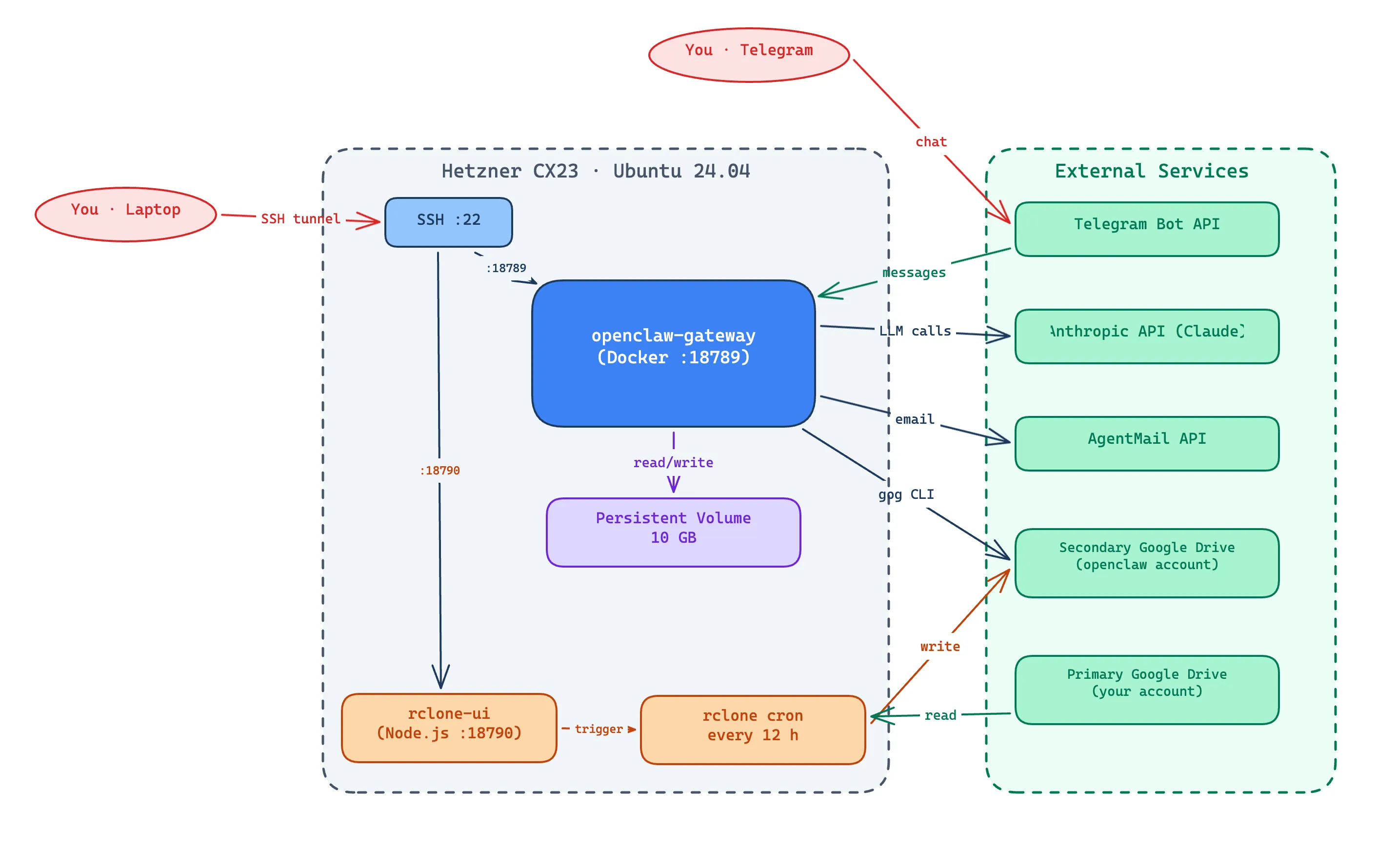
The system runs on a Hetzner CX23 VPS (Ubuntu 24.04), provisioned via Terraform with a persistent volume that survives server rebuilds. Everything is deployable from one terraform apply.
The two-account safety model
This is the core design decision. Instead of pointing the agent at my real Google Drive, I use two accounts:
- Primary — my real account, untouched by the agent
- Secondary (
klinddk@gmail.com) — a dedicated, sandboxed account that the agent connects to
rclone copy runs on a cron every 12 hours, one-way, primary → secondary. It’s additive only — it never deletes on the destination. Currently two folders are synced: A-REInvesting and kvit. If the agent misbehaves and deletes a file on secondary, the next sync restores it. The primary is genuinely safe.
Stack on the box
- OpenClaw gateway runs in Docker Compose, talking to Anthropic for LLM calls
- Telegram Bot API is the chat interface — I message the bot from my phone
- gog CLI gives the agent full Google Workspace access (Drive, Gmail, Calendar, Sheets, Docs, Contacts) on the secondary account only
- AgentMail for email actions
- rclone with two remotes (
primaryread-only,secondaryread-write), config persisted on the volume so it survives redeploys
Two separate OAuth clients
One Google Cloud OAuth client for rclone (sync), a different one for gog (agent access). Keeps the failure modes isolated — if I revoke one, the other still works.
rclone UI for managing sync without SSH
I built a small Node.js + React + Tailwind app (systemd service, port 18790, localhost-only via SSH tunnel) so I can add/remove synced folders, trigger a sync, view logs, and adjust the cron schedule from a browser instead of editing shell scripts on the server.
Network surface
The OpenClaw control UI (:18789) and rclone UI (:18790) both bind to 127.0.0.1 only — the only way in is an SSH tunnel. The agent itself is reachable only through Telegram (which authenticates against my Telegram user ID).
Results
Section titled “Results”- Fully deployed on Hetzner via Terraform —
terraform applyrecreates the box from scratch and the persistent volume restores all OAuth tokens, gog keyring, and rclone config automatically - Telegram chat works end-to-end: I can ask questions on my phone and get answers grounded in my synced Drive folders
- rclone cron runs every 12h, logs to
/home/openclaw/.openclaw/rclone/sync.log - The two-account sandbox has held up — the agent has never been able to reach my primary Drive, by construction
- Two folders actively synced (
A-REInvesting,kvit); adding more is a one-line edit torclone-sync.shor two clicks in the rclone UI
Lessons
Section titled “Lessons”- Sandboxing via account isolation is much stronger than relying on the agent to “be careful.” A misbehaving LLM can’t delete files in an account it has no credentials for.
- Persistent volumes change the redeploy story. Cloud-init reinstalls everything stateless, but tokens and keys on the volume survive.
terraform applybecomes safe to run anytime. - Localhost-only + SSH tunnel is a cheap way to expose internal admin UIs without writing auth code. Nothing fancy needed for a single-user system.