Slack AI Assistant
Problem
Section titled “Problem”A small software reseller needs to stay on top of a fast-moving market — licensing changes, competitor moves, regulatory updates. Manually monitoring this and writing internal briefings every morning doesn’t scale with a small team. They also needed a general-purpose AI assistant the team could reach directly in Slack for ad hoc questions.
Approach
Section titled “Approach”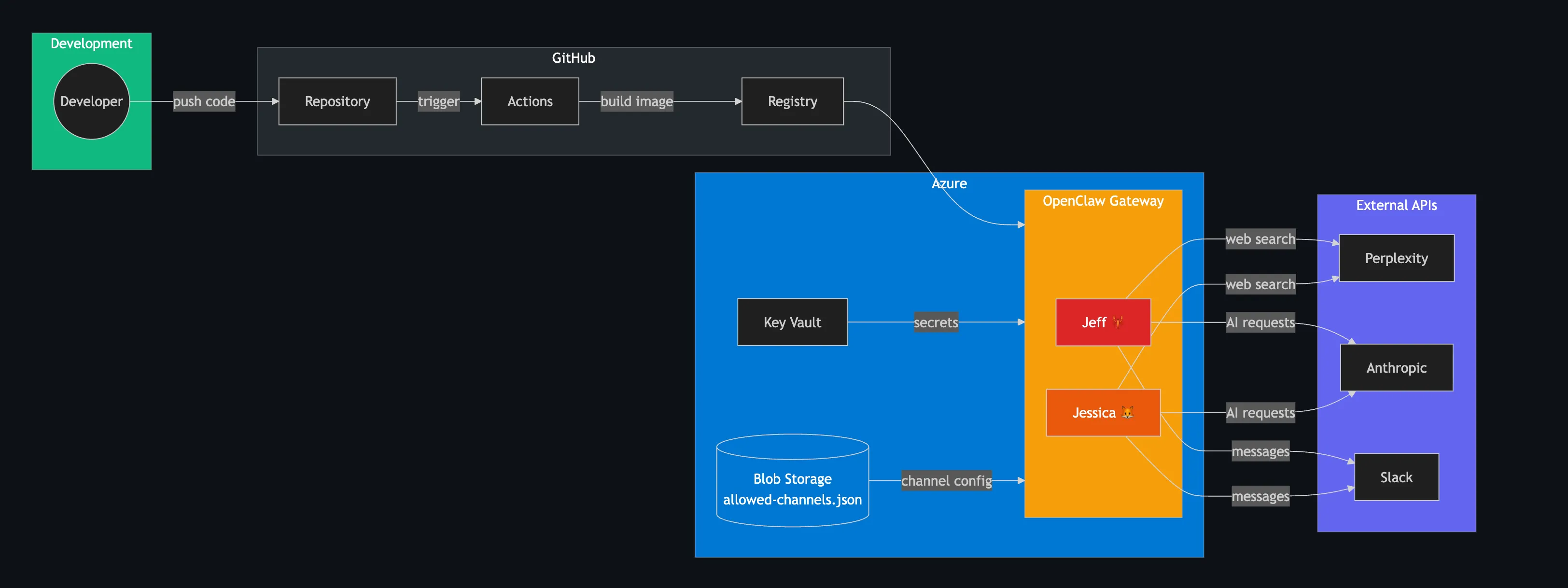
Deployed two OpenClaw AI agents in a single Docker container on Azure Container Instances, each with its own Slack app and personality:
- Jeff 🦞 — market intelligence specialist. Runs a scheduled report every weekday at midnight PST using Claude Opus, searching the web via Perplexity for Microsoft/Adobe news, competitor activity, and regulatory changes. Sends a structured Slack report with executive summary, Microsoft and Adobe news sections, competitor watch, strategic recommendations, and risk alerts.
- Jessica 🦊 — general assistant for the team. Answers questions, helps with research, and handles ad hoc tasks in Slack using Claude Sonnet (or Haiku for quick facts).
Container startup flow
The entrypoint script handles the full bootstrap sequence:
- Creates isolated workspaces at
/app/workspace-jeffand/app/workspace-jessica - Copies each agent’s Markdown config files into their workspace
- Fetches all secrets from Azure Key Vault using the container’s managed identity — only the Key Vault name and client ID are passed as environment variables
- Runs
openclaw onboardwith the Anthropic OAuth token - Pulls channel restriction rules from Azure Blob Storage and applies them
- Starts the OpenClaw gateway on loopback (127.0.0.1:18789) with socat forwarding external traffic from 0.0.0.0:8080
- Registers cron jobs for Jeff’s daily market intelligence report
- Runs a background log rotation loop (10MB threshold, preserves last 10,000 lines)
Infrastructure as Code
The entire stack is managed with Terraform, split into two layers:
- Base infrastructure (
terraform/) — Key Vault, managed identity, storage account. Run once. - Container deployment (
terraform/deploy/) — container group, image credentials, environment. Run on every push via GitHub Actions.
This separation allows rollback to a previous container image without touching infrastructure, and vice versa.
Secrets architecture — zero image contamination
All 11 secrets (Anthropic OAuth, gateway token, Slack bot/app tokens for both agents, Perplexity API key, channel IDs, channel restrictions URL) live in Azure Key Vault. The entrypoint fetches them at runtime via Azure’s Instance Metadata Service:
KV_TOKEN=$(curl -sf "http://169.254.169.254/metadata/identity/oauth2/token?..." \ -H "Metadata: true" | node -e "...")Nothing sensitive touches the Docker image, Terraform state, or Git history.
Markdown-first agent configuration
Each agent’s behaviour is defined entirely in Markdown files:
config/jeff/├── IDENTITY.md # Name, emoji, role├── SOUL.md # Personality, communication style, boundaries└── AGENTS.md # Operating instructions, model selection, scheduled tasksShared context (USER.md — org details, TOOLS.md — available integrations) is copied into both workspaces. These files are human-readable documentation that also serves as executable configuration.
Model selection is per-task. Agents choose the right Claude model based on complexity — Haiku for quick facts, Sonnet for general work, Opus for deep research and the daily report. Each response includes a subtle italic note indicating which model was used (Using Sonnet), so the team can see reasoning depth and cost.
Results
Section titled “Results”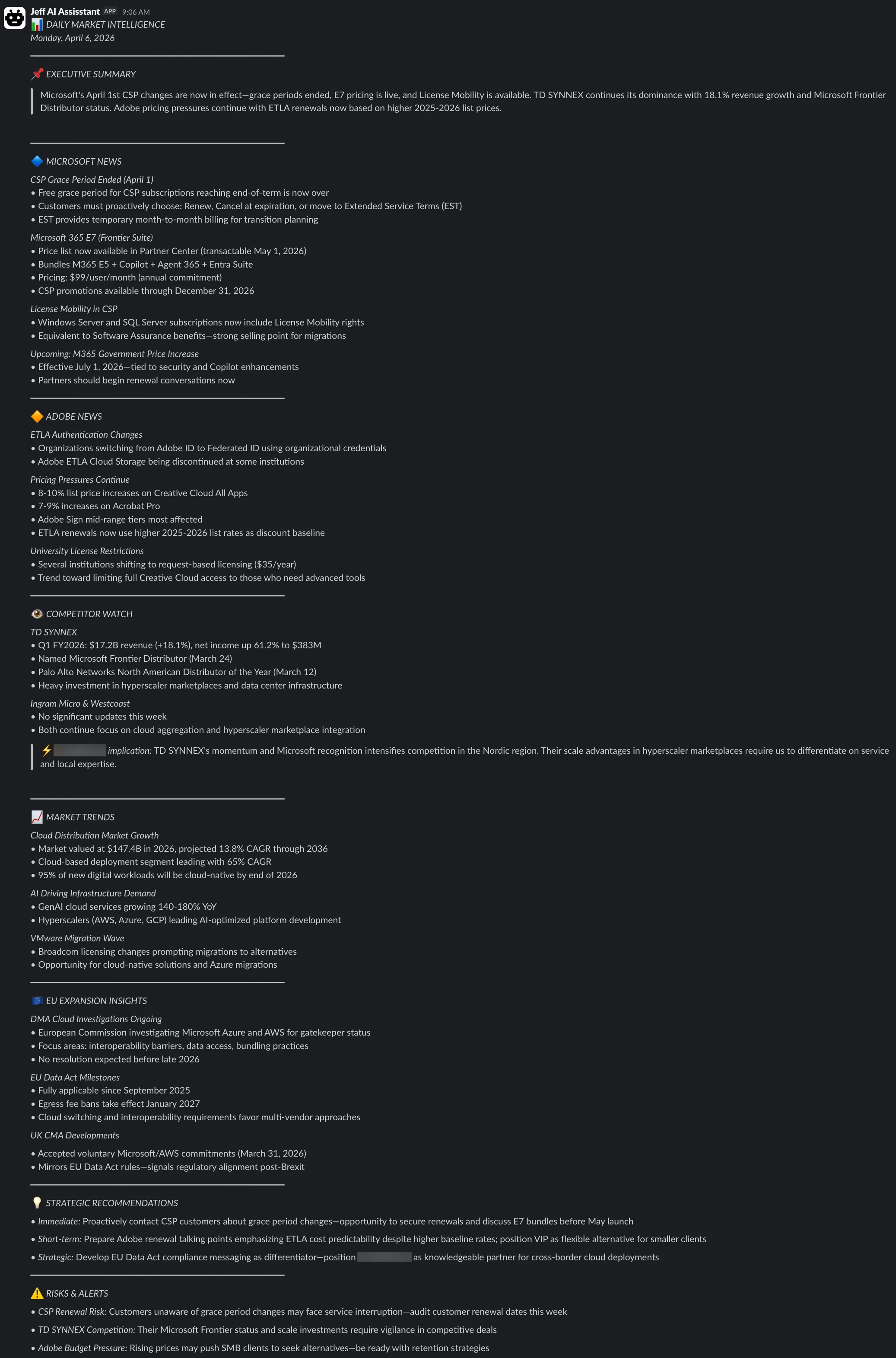
- Daily market intelligence reports delivered to Slack every weekday morning — automated, structured, and actionable
- Team can ask either agent questions directly in Slack with no context switching
- Zero secrets in the Docker image — all 11 credentials injected at runtime from Azure Key Vault via managed identity
- Infrastructure fully codified in Terraform with separate stacks for base resources and deployment, enabling independent rollback
- CI/CD pipeline builds, pushes, and deploys on every commit — with Slack notifications to both agents’ channels on start, success, or failure
- Channel access restrictions loaded dynamically from Azure Blob Storage — changeable without redeploying, just restart the container
- Rollback to any previous image tag via Terraform or the GitHub Actions UI